
Headphone compatibility (Bluetooth Classic mode)
The BT200 is officially qualified by the Bluetooth SIG and uses the standardized Bluetooth audio profiles in Classic mode. This means it can be paired with headphones from a wide range of manufacturers, whether in-ear, on-ear or over-ear.
The codec is selected automatically: if your headphones support aptX Adaptive, the BT200 uses this codec for stable, low-latency, high-quality transmission. Headphones with aptX are driven via aptX. All other Bluetooth headphones connect via SBC, the standard codec that every Bluetooth Classic audio device must support. This ensures that a connection is always established. Based on our experience and our customer support, we are not aware of any incompatibilities with Bluetooth headphones.
Only a few hearing aids support Bluetooth Classic mode. Bluetooth Classic with the A2DP audio profile consumes more power, which is critical for hearing aids running on button-cell batteries. The Bluetooth protocol of hearing aids is mainly designed for connecting to a smartphone. However, newer headphones and hearing aids may additionally support Auracast.

Compatibility in Auracast mode, e.g. for hearing aids
Auracast works like a small Bluetooth radio station: a device, for example a TV with a connected BT200 Auracast transmitter, broadcasts its sound, and any number of headphones or hearing aids nearby can listen at the same time. No fixed pairing with the transmitter is required.
The big everyday advantage: headphones and hearing aids remain connected to your smartphone. You can listen to the TV sound, for example, without missing any calls or notifications. Control is also conveniently handled via the smartphone: there you select which broadcast you want to listen to, switch between transmitters and adjust the volume. There is no need to constantly unpair and re-pair your devices.
There is one limitation, however: the connection to an Auracast broadcast is not stored permanently like a regular Bluetooth pairing. You therefore have to select and start each broadcast again the next time, for example via your smartphone or directly on your headphones.
A prerequisite is that the headphones or hearing aids support Auracast. Older Bluetooth headphones cannot receive such broadcasts.
The Auracast feature of Bluetooth offers different transmission modes, not all of which are supported by every hearing aid yet. Our BT200 uses the best audio quality, LC3 HQ (High Quality). This ensures optimal sound quality on headphones with Auracast. Many hearing aids do not yet support this mode, only LC3 SQ (Standard Quality). However, several manufacturers have announced that their hearing aids and the associated smartphone apps will support it in the future. For some models, this has already been implemented in recent months.
We have since further developed the BT200 and integrated switching between LC3 HQ and LC3 SQ into a new firmware. This new version will be shipped from November 2026. (On request, we can update older BT200 units; devices already delivered would need to be sent to us for this.)
Unfortunately, we cannot guarantee support for specific hearing aids. The following list is based on tests by hearing care professionals and customer feedback. Functionality may depend on the firmware version of the hearing aid, the app and the smartphone operating system. A new version may bring improvements. We are very grateful for both positive and negative feedback on compatibility!
Hearing aids with SQ support work with BT200 units running the firmware shipped from November 2026:
- Beltone Commence (compatible with SQ)
- Beltone Envision X (compatible with SQ)
- Bernafon Encanta (compatible with SQ)
- Kind Varo 4 (compatible with SQ)
- Oticon Intent 1 (compatible with HQ & SQ)
- Oticon Reveal (compatible with SQ)
- Philips HearLink 50 miniRITE (compatible with HQ & SQ)
- Phonak Infinio (not compatible)
- Phonak Audéo E30-R (compatible with SQ, scan the QR code)
- ReSound Savi (compatible with SQ)
- ReSound Nexia 9 (compatible with SQ)
- ReSound Vivia X (compatible with SQ)
- Signia IX platform (not compatible)
- Starkey Edge AI 20 (compatible with SQ)
- Starkey Omega AI 24 (compatible with SQ)
- Starkey Omega 20 CIC (compatible with SQ)
As of 10/2026, all information without guarantee!
If an Auracast-capable smartphone and hearing aid or headphones are used, the audio stream can also be accessed with a QR code like this one:

With the new firmware, the audio quality is shown on the BT200 display in Auracast mode:
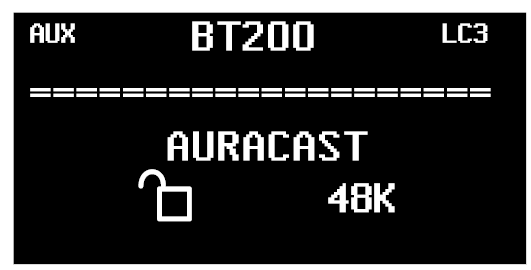
"48K" corresponds to the highest audio quality (48 kHz sampling rate, factory setting). Pressing the middle MODE button twice switches the BT200 to standard quality "24K", and pressing it twice again switches to low quality "16K". These two modes are suitable for hearing aids. Pressing the MODE button twice once more switches back to "48K". The last setting is saved.
Was this article helpful?
That’s Great!
Thank you for your feedback
Sorry! We couldn't be helpful
Thank you for your feedback
Feedback sent
We appreciate your effort and will try to fix the article